Set up your NEAR BOS development environment
Building on NEAR BOS starts with a clean local setup. The BOS stack lets you create, deploy, and store frontends in a secure, decentralized way, but you need the right tools to interact with it. This guide walks you through installing the NEAR CLI and preparing a basic component for your first test.
Open your terminal and install the NEAR Command Line Interface (CLI). This tool is essential for interacting with the NEAR blockchain and managing your BOS components. Run the following command to install the latest version:
npm install -g near-cli
Verify the installation by checking the version:
near --version

Initialize a new BOS component project. This creates the necessary directory structure and configuration files for your frontend. Use the near command to scaffold a new component:
near component create my-first-component
This command generates a basic component template with a component.json file and a source directory. You can now start adding your own logic and UI elements.
Start the local development server to preview your component. This allows you to test your code in a browser without deploying to the mainnet. Run the following command from your component directory:
near component serve
Open your browser and navigate to http://localhost:3000 to see your component in action. Any changes you make to the source files will automatically refresh the preview.
With your environment ready, you can begin building and testing your first onchain app. The local server provides a fast feedback loop, letting you iterate quickly before deploying to the NEAR blockchain.
Compose your frontend using BOS components
You don’t have to build every UI element from scratch. The BOS ecosystem provides a library of reusable, onchain components—like account cards, token widgets, and navigation bars—that you can drop directly into your application. This composability lets you focus on unique logic rather than reinventing basic interface patterns.
Think of these components as LEGO bricks for the blockchain. Instead of molding plastic for every single piece, you snap together existing, tested modules to create complex structures quickly. This approach significantly reduces development time and ensures your app looks consistent with the broader NEAR ecosystem.
To start, browse the NEAR BOS Explorer to find components published by other developers. You can copy the widget code snippet and paste it into your own project’s render method. The component will fetch its data onchain and render itself automatically.
By leveraging these shared assets, you maintain a decentralized architecture while accelerating your build process. The official NEAR BOS documentation provides detailed guides on how to import and customize these widgets to fit your specific design needs.
Deploy your app to the NEAR blockchain
NEAR BOS Crypto works best as a sequence, not a scramble through settings. Do the minimum first: confirm compatibility, connect the core hardware, update only when needed, and test the result before adding optional features. That order keeps the task understandable and makes failures easier to isolate. After each step, pause long enough for the interface to finish syncing. Many setup problems are timing problems disguised as configuration problems. If the same step fails twice, record the exact error, restart the smallest affected piece, and retry before moving deeper.
Integrate cross-chain liquidity with NEAR Intents
NEAR BOS Crypto works best as a clear sequence: define the constraint, compare the realistic options, test the tradeoff, and choose the path with the fewest hidden costs. That order keeps the advice usable instead of decorative. After each step, pause long enough to check whether the recommendation still fits the reader's actual situation. If it depends on perfect timing, unusual access, or a best-case budget, include a simpler fallback.
The simplest way to use this section is to keep the setup small, verify each change, and record the stable configuration before adding optional accessories.
Verify your NEAR BOS Crypto strategy
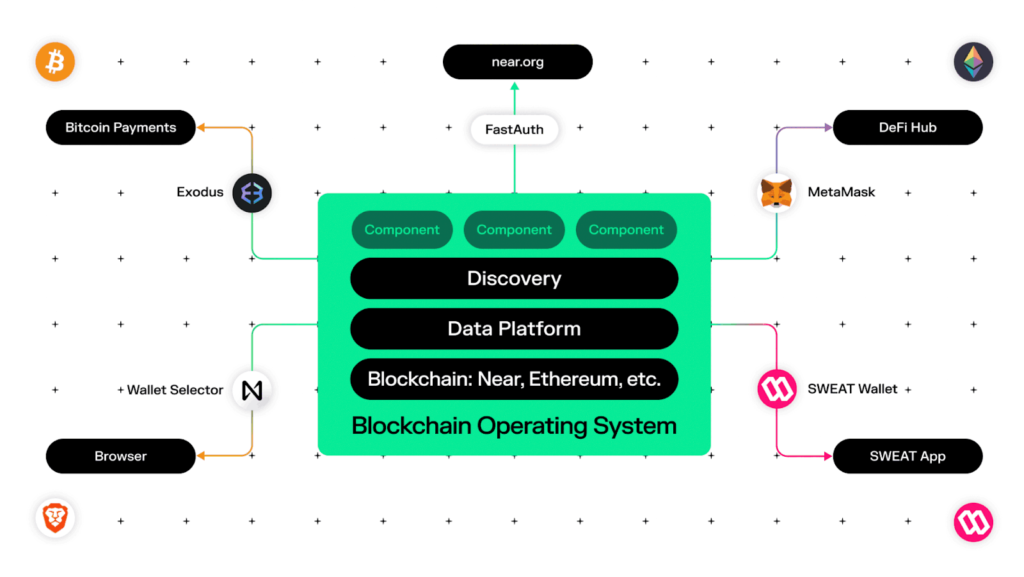
Before you promote your app to the community, run through this verification checklist. A clean build prevents user friction and ensures your smart contracts behave as expected on the NEAR Blockchain Operating System (BOS).
This process acts as your final quality gate. By catching issues early in the BOS environment, you save time and build trust with your early adopters.
Is NEAR Protocol a good crypto to invest in?
NEAR Protocol positions itself as the open infrastructure for the agent economy, unifying liquidity across 35+ chains while keeping execution confidential 1. For investors, this means betting on a Layer 1 blockchain that prioritizes scalability and strong developer activity over simple store-of-value narratives.
The token offers low fees and fast transactions, which are essential for the BOS (Build on NEAR) ecosystem to function smoothly. However, crypto assets remain highly volatile. It is a speculative play on the growth of on-chain agents rather than a guaranteed return.
No comments yet. Be the first to share your thoughts!